Track your face over time with Lookist scan history
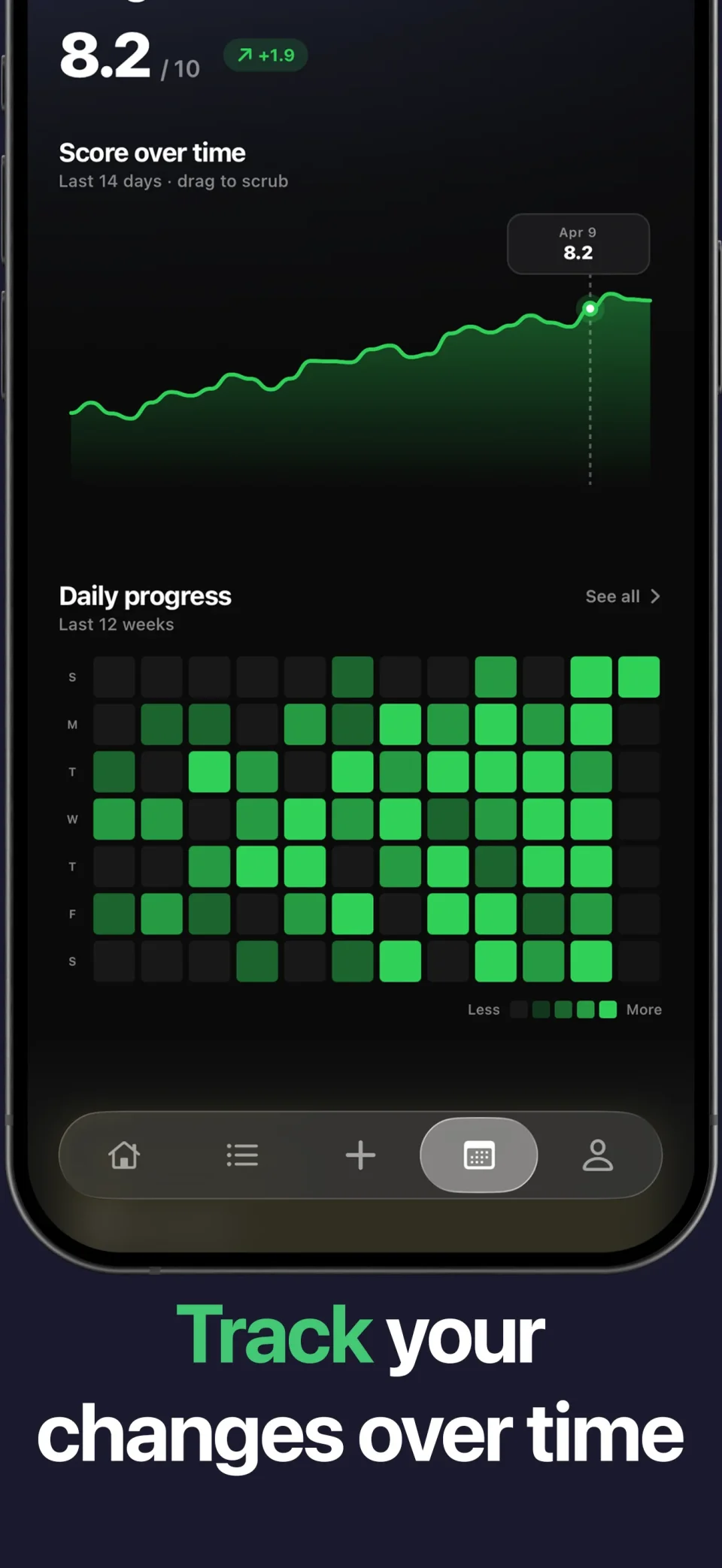
Lookist saves every finished scan of your face with its photos and scores. Open any scan to see its score and how much each number moved since the scan before it. The Progress screen charts your score over the last 14 days. Change is easiest to see when every photo is taken in the same light, distance and angle.
Lookist keeps every scan, photo and score, so you can see what changed since your first day.
Download Lookist for iPhoneStep by step
- Scan in the same setup. On the Scan tab, tap Tap to scan today. Use the same room, light and distance as last time. Add the front photo and, if you added them before, the left and right sides. Tap Submit.
- Open the scan. Your scans are listed under the scan dial on the Scan tab. Tap one to open it.
- Read the change. Next to SESSION SCORE, a plus or minus number shows the change since your previous scan. The headline scores show their own change.
- See the chart. Tap your profile photo at the top right, then Progress & stats. Score over time charts the last 14 days.
What does Lookist keep from each scan?
Each finished scan keeps its photos, its overall score, the 15 feature scores and the notes under WHAT WE NOTICED. On the scan screen, tap the photo to see it full screen. Share progress sends the scan photo through the iPhone share sheet.
The Progress screen adds your DAY STREAK, your BEST streak, your number of SCANS, a Daily progress grid for the last 12 weeks and Your scans. For streaks and achievements, read Lookist streaks.
Why does my score change so little between scans?
When you scan again, Lookist sends your last scores and the number of days since that scan along with the new photos. Within 3 days, the scan is told to expect almost no change, a tenth of a point at most unless something looks clearly different. After 2 weeks, larger changes are allowed when the photos show them. Equal scores on photos taken days apart are expected.
This keeps the history steady from day to day. It also means a real change, such as clearer skin, shows up over weeks of scans rather than in one jump.
How do I compare scans fairly?
Treat each scan as a photo taken under test conditions. Keep these the same every time:
- Distance. A camera at 12 inches makes a nose look about 30% larger than at 5 feet.
- Light. Face the same window at the same time of day.
- Angle and expression. Camera at eye level, head straight, face relaxed.
- Sleep. One night without sleep made faces look more tired, with redder eyes and darker circles, in a controlled study.
- Photos. Use the same angles each time. A scan with side photos and one without them do not weigh the jawline the same way.
Frequently asked questions
How can I track my facial progress?
Take the same photo at regular times, for example once a week in the same room and light, and compare the scores and the photos. In Lookist, every scan is saved with its scores, and each scan shows the change since the previous one. Read how to track facial improvement over time.
How often should I scan my face?
Once every few days to once a week is enough to see a trend. Lookist allows 3 scans a day, but a face does not change in hours while the photo does. Scans weeks apart in the same setup show more than many scans on one day.
Can I delete one scan from my history?
No. The app has no button to delete a single scan. Your scans stay in your account while it is active so your history works. To remove all of your data, read how to delete your Lookist account.
Do friend scans go into my history?
No. A friend scan is not saved, does not change your scores or streak and does not use one of your daily scans. Read how to scan a friend.
Sources and product details
- Lookist on the App Store (checked November 7, 2026)
- Ward B. et al., Nasal Distortion in Short-Distance Photographs: The Selfie Effect, JAMA Facial Plastic Surgery (2018) (checked November 7, 2026)
- Sundelin and colleagues, 2013: Cues of fatigue, effects of sleep deprivation on facial appearance (Sleep) (checked November 7, 2026)
For photo handling and account controls, read our privacy policy. For an issue with Lookist, visit support.
Put your report to use
Lookist keeps every scan, photo and score, so you can see what changed since your first day.
Download Lookist for iPhone